Browser
Create account
Send verification code
Submitting signup form
PNTR TestKit
Wait for the exact email or webhook your Playwright, Cypress, or CI run triggered.
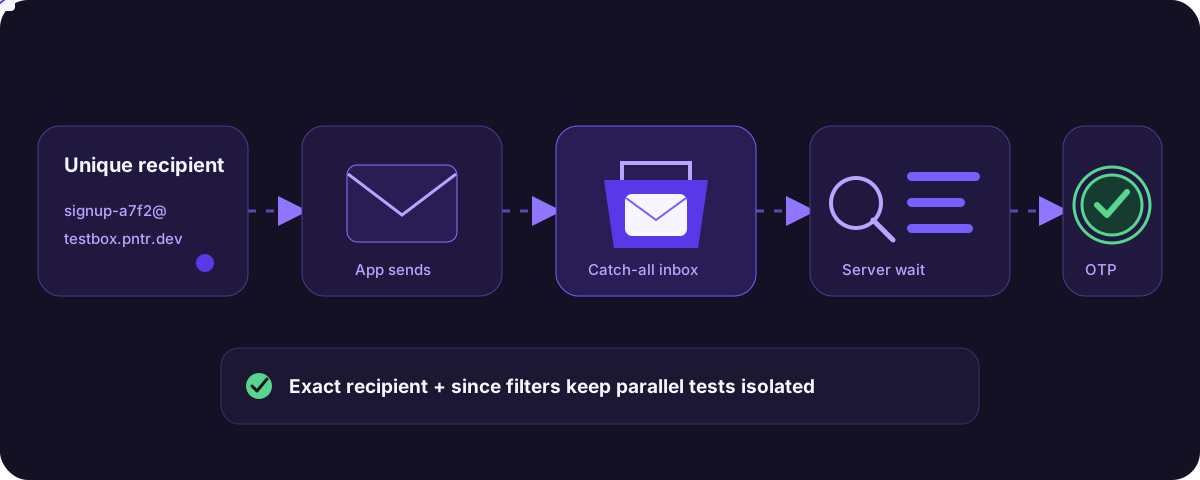
Replace repeated inbox downloads and fixed sleeps with one filtered request that resolves when a matching event arrives.
Filter by recipient, sender, subject, and the time your test started.
Filter by method, path, header, body content, and a freshness boundary.
PNTR holds the wait on the server and returns HTTP 408 when nothing matches.
This is the shortest complete path from a new PNTR subdomain to one captured webhook and one received test email.
Interactive walkthrough
One recipient, one matching message, one passing test.
Browser
The browser triggers one message
Each test run gets a unique recipient before the signup action. Autoplay is disabled by your motion preference.
Open the focused dashboard setup to select an existing hostname or create one. PNTR enables Email Inbox and Request Capture together.
Sign in with GitHub, then generate the token linked from the TestKit setup. Copy it when it appears because PNTR shows the raw value once.
Send test messages and provider sandbox payloads only. TestKit waits for captured data; it does not replace application-side security checks.
Node 20 or newer is recommended. The examples use a main() wrapper, so they do not depend on top-level await support.
mkdir pntr-smoke && cd pntr-smokenpm init -ynpm install --save-dev @pntr/testkit@latest tsx typescript @types/node dotenvReplace the hostname with the full domain shown in your dashboard. Add .env to .gitignore before saving a real token.
PNTR_TOKEN=pntr_your_token_herePNTR_HOSTNAME=testkit-smoke.pntr.dev{ "compilerOptions": { "target": "ES2022", "module": "NodeNext", "moduleResolution": "NodeNext", "types": ["node"], "strict": true, "noEmit": true }, "include": ["*.ts"]}.envnode_modules/Save this as webhook-smoke.ts, then run npx tsx webhook-smoke.ts. It starts the server-side wait before sending the matching POST.
import "dotenv/config";import { PntrTestKit } from "@pntr/testkit";function required(name: "PNTR_TOKEN" | "PNTR_HOSTNAME"): string { const value = process.env[name]; if (!value) throw new Error(name + " is required"); return value;}async function main() { const hostname = required("PNTR_HOSTNAME"); const pntr = new PntrTestKit({ token: required("PNTR_TOKEN") }); const marker = "smoke-" + Date.now(); const path = "/testkit-smoke"; const startedAt = new Date(); const waiting = pntr.waitForWebhook(hostname, { method: "POST", path, bodyContains: marker, since: startedAt, timeoutSeconds: 20, }); const response = await fetch("https://" + hostname + path, { method: "POST", headers: { "Content-Type": "application/json" }, body: JSON.stringify({ marker }), }); if (!response.ok) { throw new Error("Webhook returned HTTP " + response.status); } const request = await waiting; console.log("PASS", { hostname, method: request.method, path: request.path, body: request.body, });}main().catch((error) => { console.error(error); process.exitCode = 1;});Save this as email-smoke.ts and run it. While it waits, send a message to the printed address with subject PNTR smoke and body Verification code: 482917.
import "dotenv/config";import { PntrTestKit, extractOtp } from "@pntr/testkit";function required(name: "PNTR_TOKEN" | "PNTR_HOSTNAME"): string { const value = process.env[name]; if (!value) throw new Error(name + " is required"); return value;}async function main() { const hostname = required("PNTR_HOSTNAME"); const recipient = "smoke@" + hostname; const pntr = new PntrTestKit({ token: required("PNTR_TOKEN") }); console.log("Waiting for an email to " + recipient); const message = await pntr.waitForEmail(hostname, { recipient, subject: "PNTR smoke", since: new Date(), timeoutSeconds: 25, }); const otp = extractOtp(message); if (otp !== "482917") { throw new Error("Expected OTP 482917, received " + otp); } console.log("PASS", { sender: message.sender, recipient: message.recipient, subject: message.subject, otp, });}main().catch((error) => { console.error(error); process.exitCode = 1;});Open Admin > Funnel. A successful run records request_wait_success as Successful webhook waits and email_wait_success as Successful email waits. These events are recorded by the API, so browser ad blockers do not remove them.
Confirm public DNS and Node's resolver separately. On macOS, clear the negative DNS cache if dig succeeds while Node still fails. Replace the sample hostname with yours.
dig +short testkit-smoke.pntr.devnode -e "require('node:dns').lookup('testkit-smoke.pntr.dev', { all: true }, console.log)"# macOS only, if dig works but Node still returns ENOTFOUNDsudo killall -HUP mDNSResponder.env has a typo. Use the full hostname shown beside the subdomain in the same account that created the token.@types/node and keep "types": ["node"] in tsconfig.json. The setup above already includes both.Use the typed package in Playwright or call the CLI from any CI shell step. Both wait on PNTR's server.
npm install --save-dev @pntr/testkitawait pntr.waitForEmail("testbox.pntr.dev", options);recipient="$(pntr recipient testbox.pntr.dev \ --prefix signup)"pntr email wait "$PNTR_EMAIL_SUBDOMAIN_ID" \ --to "$recipient" \ --subject "Verification code" \ --since 5m \ --timeout 20s \ --jsonpntr webhook wait "$PNTR_WEBHOOK_SUBDOMAIN_ID" \ --method POST \ --path /stripe \ --body-contains "payment_intent.succeeded" \ --since 5m \ --timeout 20s \ --jsonimport { PntrTestKit, createRecipient, extractOtp,} from "@pntr/testkit";const pntr = new PntrTestKit({ token: process.env.PNTR_TOKEN!,});const emailDomain = "testbox.pntr.dev";const recipient = createRecipient(emailDomain, { prefix: "signup",});const startedAt = new Date();// Capture startedAt before the browser action triggers the email.await page.getByLabel("Email").fill(recipient);await page.getByRole("button", { name: "Sign up" }).click();const message = await pntr.waitForEmail(emailDomain, { recipient, subject: "Verification code", since: startedAt, timeoutSeconds: 20,});const otp = extractOtp(message);import { PntrTestKit } from "@pntr/testkit";const pntr = new PntrTestKit({ token: process.env.PNTR_TOKEN!,});const startedAt = new Date();// Trigger the provider's test-mode delivery after recording startedAt.await triggerTestPayment();const delivery = await pntr.waitForWebhook("hooks.pntr.dev", { method: "POST", path: "/stripe", bodyContains: "payment_intent.succeeded", since: startedAt, timeoutSeconds: 20,});expect(delivery.body_truncated).toBe(false);The report confirms that PNTR matched a real email or webhook. It remains owner-only and does not copy captured content into persistent report history.
import { appendFile } from "node:fs/promises";import { formatReportMarkdown, PntrTestKit,} from "@pntr/testkit";const pntr = new PntrTestKit({ token: process.env.PNTR_TOKEN!,});const message = await pntr.waitForEmailWithReport( "testbox.pntr.dev", { recipient, since: startedAt },);if (process.env.GITHUB_STEP_SUMMARY) { await appendFile( process.env.GITHUB_STEP_SUMMARY, formatReportMarkdown(message.report), );}Stored reports omit addresses, subjects, bodies, request paths, headers, source IPs, and payloads.
pntr env create provisions -mail and -hook sibling subdomains. Each environment uses two subdomain quota slots.
pntr env create "ci-$GITHUB_RUN_ID" \ --output .pntr-test-env.json \ --jsonpntr env delete \ --manifest .pntr-test-env.json \ --confirm \ --jsonEvery local part reaches the catch-all inbox. Recipient and since filters make each run select only its own message.
POST ci-8421-hook.pntr.dev/stripe
Match a webhook by path, header, method, body content, and start time.
Free includes 2 parallel waits. Premium includes 10.